Homework 5: Pokedex
Due March 5th at 11:59 PM
This homework will be a chance for you to work with the React library to build a simplified Pokedex of the first 151 Pokémon! Like homework 3, this will primarily be a front-end focused homework- you will be working with a provided API to retrieve data about the Pokémon and display it in your React app, but you won't have to worry about building the backend for this homework. This homework will be a fun opportunity for you to practice working with React props, as well as implementing some common frontend features such as modals, pagination, and search bars.
Assignment Goals
- Build a simplified Pokedex of the first 151 Pokémon as a React SPA (Single-page application)
- Learn to work with common UI patterns such as modals, pagination, and search bars
- Get comfortable working with React projects using the Vite build tool
Introduction & Installation
Starter CodeWhat is a Pokedex?
A Pokedex is a digital encyclopedia that provides information about different species of Pokémon from the Pokémon franchise of video games. In this homework, you will build a simplified version of a Pokedex that displays information about the original 151 Pokémon.
You will not need domain knowledge about the Pokémon franchise to do this project. However, there are some important terms to review that may help when designing your Pokedex. We'll provide their definitions as they relate to the app below:
- Pokémon: A creature that can be caught and stored in your Pokedex
- Pokedex: A device for viewing Pokémon information and tracking catches
- Box: An online storage container for caught Pokémon entries
There are many online resources you may reference to inspire the design of your Pokedex. For instance, Pokémon Showdown has a searchable Pokedex that contains a lot of information. Your web application will show a much smaller subset of information and be paginated, but should generally show serve a similar function to similar online Pokedexes.
Files
The starter code for this homework has been booted up with the Vite build tool. You should be familiar with this file structure from lecture activities. We've provide some additional files of note:
- colors.ts in util
- types.ts in util
- prettier config and format command
- README.md
- API.md
You will start with the boilerplay code provided by Vite and build your application from there. You should make good use of modularization and break up your code into different files and Components as you see fit. Points may be taken off for messy projects, files that are too long and not modularized, and code that is not well-organized, so make sure to put some thought into the structure of your project and how to break up your code!
To start this homework you should run npm install to install the dependencies for the project, and then npm run dev to start the development server.
Style
Similar to homework 3, there is no required style or layout for this project, but you should make sure your app is visually appealing and easy to use. We provide suggestions for design throughout this assignment, but you may choose to implement a different style if you prefer, so long as it still meets the criteria of the rubric.
You may also elect to use a style library such as Tailwind CSS, Material UI, or Bootstrap to style your app and make your life easier during development. If you choose to use a style library, make sure to include the necessary dependencies and configuration in your project. Make sure in your submission, you provide all the files and instructions (in your README) needed to run your project if it requires more than just running npm install and npm run dev.
Instructions
Part 1: Fetch Pokemon and Display
The purpose of a Pokedex is to display information about Pokemon gotten from the API, so your first task is to implement the functionality to fetch Pokemon data and display it in your app.
Implement a component that fetches data about the first 151 Pokemon from the provided API endpoint and displays only the name, image, and types of the pokemon. You can use the provided colors.ts file to style the types of each Pokemon based on their type. We recommend you try a card UI design to display the information about each Pokemon, but feel free to get creative with the design!
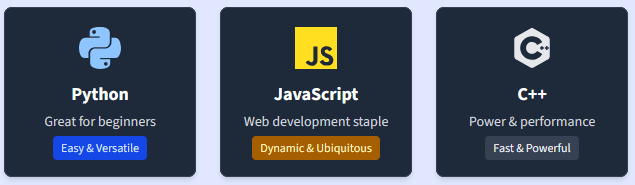
What is a Card?
A card is a UI component that groups related information together in a visually distinct container.
Here's an example:
Part 2: Pagination
Okay, now you should have a display of 151 Pokemon in a scrollable page. However, this isn't the most user-friendly design, and also takes a long time to load due to needing to retrieve so much information at once. In this section, you will implement pagination to break up the Pokemon into different pages of 10 Pokemon each, with buttons to switch between the pages. This will make the app more user-friendly and faster to load, while also giving you practice working with pagination, which is a common feature in web applications.
Implement a way to track what "page" of the Pokedex the user is on, and buttons to switch between pages. When a page button is clicked, the display should update to show the correct 10 Pokemon for that page. You can implement the pagination however you like, but we recommend a simple design with "Previous" and "Next" buttons to switch between pages, as well as buttons for each individual page number.
You should refer to API.md for more information about how pagination work within the API. You'll need to find a way to dynamically input the limit and offset parameters for the API calls based on what page the user is on, so that you are only fetching the data for the 10 Pokemon that should be displayed on that page. Make sure to also handle edge cases such as when the user is on the first or last page and the "Previous" or "Next" buttons should be disabled.
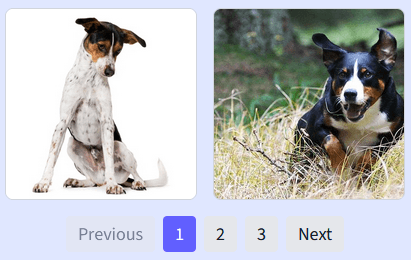
Pagination
Pagination is a UI pattern that breaks up content into different pages, with buttons to switch between the pages. This is commonly used in web applications to make it easier for users to navigate through large amounts of content without being overwhelmed.
Image carousels are a common example of pagination, as seen below:
Part 3: Pokemon Info Modals
There's one last part of the Pokemon information that we haven't displayed yet- The flavour text! We will display this short description of each Pokemon in a modal that pops up upon some user input, usually a click to some button or element.
Implement a modal that pops up when you click on a Pokemon display or some button you provide, and displays all the information provided from the API about the Pokemon, including name, sprite, types, and flavour text. You can style the modal however you like, but make sure it's visually distinct from the rest of the page and easy to read. You should also implement a way to close the modal, such as a close button or clicking outside the modal to close it. (Hint: This will likely involve managing some state to track whether the modal is open or closed!)
Modals
Modals are a UI pattern that allows you to display additional information without navigating to a new page. This is commonly used in web applications to provide more details or actions related to a specific item.
Part 4: Search Functionality
As the final feature to this Pokedex, we'll implement a simple search functionality to allow users to search for Pokemon by name and by type. This will be a good opportunity to practice working with search bars and filtering content based on user input, which is a common feature in web applications.
Implement a search bar that allows users to search for Pokemon by name and/or by type. When the user types in the search bar or selects a type, the display should update in when you click a search button to show only the Pokemon that match the search query (you should not update the results during typing to improve performance on the API backend). You can implement the search functionality however you like, but we recommend a simple design with a text input for searching by name, and a dropdown or set of checkboxes for searching by type. Make sure to also handle edge cases such as when there are no Pokemon that match the search query.
Once again, refer to API.md for more information about how to implement search functionality with the API. For search results, you should make sure your results are paginated as well, with the same 10 Pokemon-per-page limit as before.
Submission
README
Answer the provided reflection questions within the starter code README file. In this reflection, you will also indicate whether or not you used AI, and also document your usage of AI as well. Please don't forget this step, as it is important feedback for the homework and the content of the course!
Submission
Submit your code through Gradescope as a .zip file that contains your project. Make sure your project includes all files you worked on during this homework and your README.md file. Make sure the submitted file structure within your submission is exactly or similar to the file structure you used to run and develop the project. Points will be taken off for malformed project structures in the final submission!
Before you submit, make sure you lint your code for style errors using the command npm run lint. We will be using the eslint rules provided by Vite for linting this project.
For this homework, we've provided a rubric file named RUBRIC.md in the starter code. Make sure to read through it carefully and ensure that your submission meets all the requirements outlined in the rubric. This will help you maximize your score and ensure that you've covered all necessary aspects of the assignment.